
Archive for the 'Software' Category
Microsoft Office: Action Figures Sold Separately*
February 20, 2008Do you remember that toy you wanted for Christmas when you were a kid? I’m talking about the toy that you begged your parents for and put on your Christmas list twice. The TV commercial made the toy look totally awesome (or even “rad”). This was the toy that would make all your childhood dreams come true! How would you feel if you had gotten that toy and then, frankly, it sucked?
That’s probably how many people feel this week. Microsoft released documentation for its binary Office file formats – Word, Excel, and PowerPoint. People have been clamoring for it for years, and it’s finally here. Now that the wait is over, many will no doubt wonder what the fuss was all about.
Microsoft’s newest Office file formats, introduced in Office 2007, have documentation available. Microsoft has been working hard to get these new formats, called Office Open XML (OOXML), standardized by international standards bodies. Microsoft is working hard to encourage adoption of OOXML, both by standards bodies and users. The OOXML file formats are enabled by default in Office 2007, causing many people to use the new formats without even realizing it. More than once I have had to return a “docx” file – created with Word 2007 – back to the sender and ask for a “doc” file instead. Microsoft created a converter for translating “docx” files into “rtf” files that can be read by older versions of Microsoft Word. The converter is inconvenient to use, though, and the results are sometimes quite different from the original.
The reality is that most people – particularly businesses – haven’t upgraded to Microsoft Office 2007. Indeed, even businesses that have upgraded probably have years worth of documents that were created with older versions of Office. It is these older versions of Microsoft Office where all the action is. Open Office, in particular, seems targeted at users of Office XP and Office 2003. One sticking point that seems to keep many people from switching to Open Office (and it’s very attractive price tag) is true Microsoft Office compatibility. Office support is only partial, and often a document created in Microsoft Word will not display properly in Open Office. Other contendors – AbiWord, Nisus Writer (Express and Pro), and Pages – share the same fate.
Unless an application can guarantee 100% Microsoft Office compatibility, the argument goes, it won’t be able to win many converts. The explanation for the lack of compatibility usually involves a complaint about Microsoft’s closed Office file formats. The file formats introduced in Office 2007 differ from the earlier formats in one critical way: the Office 2007 formats store everything in a readable text format; the old formats are binary files. After years of asking, pleading, hoping, wishing, and dreaming by programmers, Microsoft finally revealed the meaning of all the bits in those binary files. And, now that they have, nothing is likely to change.
The problem is that the specifications are hopelessly complex. The specification for the current Microsoft Word binary file format (used by Word 97, 2000, XP, 2003, and 2007) is a 210 page PDF document. What many had thought was a deliberate attempt to obfuscate and deliberately hinder the competition, may turn out to be just a series of sensible design choices that reflect the long histories of the applications in Microsoft Office. Joel Spolsky has a great article on the subject that I highly recommend. Joel is a software developer and writes primarily for a technical crowd, but most of the article should be accessible to non-techies.
Only time will tell if the binary Office file format specs end up being useful to the programming community. I think we may see some incremental improvements to existing Office file format support, but I doubt we will see anything revolutionary.
* No, I am not talking about Source Fource.
OmniFocus Basics Video
February 17, 2008 I know you’re all waiting for the Apple Briefs review of OmniFocus that is sure to appear Any Day NowTM. Actually, as I stated previously, I am waiting until Things is feature complete because I plan to do a comparison review (or, more likely, a series of reviews) and I want it to be a fair comparison. In the meantime, you can head on over to The Omni Group blog to check out a new video on OmniFocus Basics. There are no big GTD secrets in the video, but it does cover the basic features of OmniFocus well.
ScreenFlow: Pro Screencasting
February 14, 2008I have been looking into putting a few screencasts on Apple Briefs but hadn’t started looking at screencasting software yet. Today I think that search is over before it even began. ScreenFlow from Vara Software has left me absolutely speechless.
ScreenFlow is like a flight data recorder on an airplane. While recording, ScreenFlow isn’t just filming, it is tracking mouse movements, foreground windows, keypresses, and more. All that information shows up in ScreenFlow’s post-production environment. You can check it all out in (surprise) a number of screencasts on Vara’s website.
Firefox 3.0 Beta 3 Available
February 14, 2008 Are you feeling a little nostalgic? Do you miss Lost in Space and boxy steel robot toys? If so, you may want to check out Firefox 3.0 beta 3 (you can download it here). Firefox 3.0 beta 3 is the latest vision of the browser of the future from the Mozilla Foundation. Thankfully, Firefox 3.0 beta 3 is a little more futuristic than Mozilla’s chosen new robot mascot. I wonder if this means we’ll be getting a new icon for Firefox?
I tend to use a variety of browsers – some Safari, some OmniWeb, and a very, very little Firefox. I use Firefox on Windows because it’s not Internet Explorer. On the Mac, though, Firefox just didn’t feel right. That is, until now. One of the most noticeable new features of Firefox 3.0 beta 3 is that it sports a more Mac-like appearance. It’s like Safari, with curves.

Firefox 2

Firefox 3

Safari 3
Firefox 3.0 beta 3 sports much more than a new skin, though. There are tons of new features. A few of the most significant ones (to me) are:
Download Manager. There is a new download manager that supports resumable downloads. This could be a boon for people who do some downloading, but not enough to justify buying something like Speed Download. This is a case of Firefox playing feature catch-up with Safari.
Bookmark Management. You now save bookmarks using a star button in the location bar. One click adds a bookmark. Two clicks lets you file and tag the bookmark. I would happily show you a preview, but the word is that the interface is likely to change from now until the final version.
Auto-Complete. The location bar auto-complete feature now lets you type either part of a url, the title of a web page, or a bookmark tag to get a list of results.

Smart Places. A smart places folder lists your favorite sites, recently bookmarked sites, and recently tagged sites.
Of course, there is a lot more to Firefox 3.0 beta 3 than what I have listed here. Many of the features, like the security features and coding improvements (to improve reliability and lower memory usage) won’t be immediately obvious but are equally important in the long run. Don’t be embarrassed, though. I know you just want to use it for the robots.
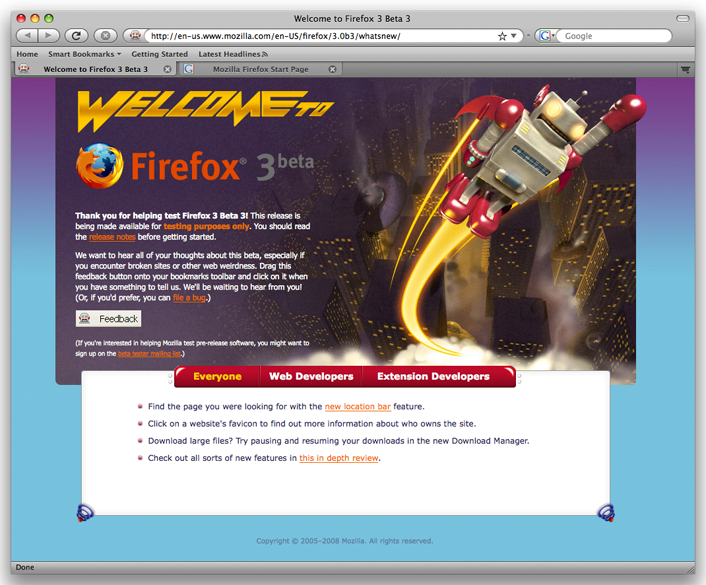
Remember, Firefox 3.0 beta 3 is beta software. If you use Firefox for work, you might want to stick with version 2. Users have reported problems with a few sites, including some of the major email providers like Yahoo, Windows Live Mail, and Gmail. But if you’re like me and have to be on the cutting edge, take a look at Firefox 3.0 beta 3 to see where browsers are headed.
Article: Why Use a Mac in Your Law Firm
February 2, 2008I have posted an article called Why Use a Mac in Your Law Firm. I know that many of my readers are already Mac users. If that describes you, you may still learn a thing or two about your computer. If you’re not already a Mac user, then come in, get comfortable, and be prepared to be blown away.
The article doesn’t allow comments. I would love to hear your thoughts, though. So please leave any comments, suggestions, or criticisms for the article in the comments here.