
Archive for the 'Internet' Category
LinkedIn Mobile: False Start, 5-Yard Penalty, Repeat the Down
February 25, 2008LinkedIn, the social networking site for professionals, released a mobile version over the weekend. You can access it by visiting http://m.linkedin.com from your mobile browser. The reason this is news for Apple users is that there is a special version of LinkedIn for the iPhone.
I briefly tested the mobile version of LinkedIn and it seems like a good first step, but it is missing a few features. Overall, the experience is a pleasant one. There are three tabs: Updates, Contacts, and Profile. Above the tabs are links for Search and Invite. Navigation was straightforward and pages loaded quickly (a nice contrast with the regular site which has become quite slow).
The first limitation I noticed is that you can’t update your profile. In fact, you can’t really do much of anything besides invite people. This makes sense to a certain degree given the medium – mobile phones with very slow data entry. It doesn’t really work, though, for a social networking site and turns the LinkedIn mobile website into a glorified address book.
Unfortunately, the LinkedIn mobile website doesn’t fill that role very well because the mobile profiles are missing a lot of the information you will find on the regular site. A few egregious examples – vcards, email addresses, and website links are nowhere to be found. For some strange reason, you also can’t view your contacts’ connections.
They will probably eventually get it right, but it’s really a wonder that they released it in this state. Calling it a Beta website is quite the misnomer. Beta software is supposed to be feature-complete (or nearly so). The LinkedIn mobile website feels more like a technology demonstration than something “ready to go except for the testing.” Thankfully, there is a feedback button at the bottom of each page. If you’re adept at the iPhone keyboard, I suggest sending LinkedIn a note or two to remind them what social networking is all about.
Firefox 3.0 Beta 3 Available
February 14, 2008 Are you feeling a little nostalgic? Do you miss Lost in Space and boxy steel robot toys? If so, you may want to check out Firefox 3.0 beta 3 (you can download it here). Firefox 3.0 beta 3 is the latest vision of the browser of the future from the Mozilla Foundation. Thankfully, Firefox 3.0 beta 3 is a little more futuristic than Mozilla’s chosen new robot mascot. I wonder if this means we’ll be getting a new icon for Firefox?
I tend to use a variety of browsers – some Safari, some OmniWeb, and a very, very little Firefox. I use Firefox on Windows because it’s not Internet Explorer. On the Mac, though, Firefox just didn’t feel right. That is, until now. One of the most noticeable new features of Firefox 3.0 beta 3 is that it sports a more Mac-like appearance. It’s like Safari, with curves.

Firefox 2

Firefox 3

Safari 3
Firefox 3.0 beta 3 sports much more than a new skin, though. There are tons of new features. A few of the most significant ones (to me) are:
Download Manager. There is a new download manager that supports resumable downloads. This could be a boon for people who do some downloading, but not enough to justify buying something like Speed Download. This is a case of Firefox playing feature catch-up with Safari.
Bookmark Management. You now save bookmarks using a star button in the location bar. One click adds a bookmark. Two clicks lets you file and tag the bookmark. I would happily show you a preview, but the word is that the interface is likely to change from now until the final version.
Auto-Complete. The location bar auto-complete feature now lets you type either part of a url, the title of a web page, or a bookmark tag to get a list of results.

Smart Places. A smart places folder lists your favorite sites, recently bookmarked sites, and recently tagged sites.
Of course, there is a lot more to Firefox 3.0 beta 3 than what I have listed here. Many of the features, like the security features and coding improvements (to improve reliability and lower memory usage) won’t be immediately obvious but are equally important in the long run. Don’t be embarrassed, though. I know you just want to use it for the robots.
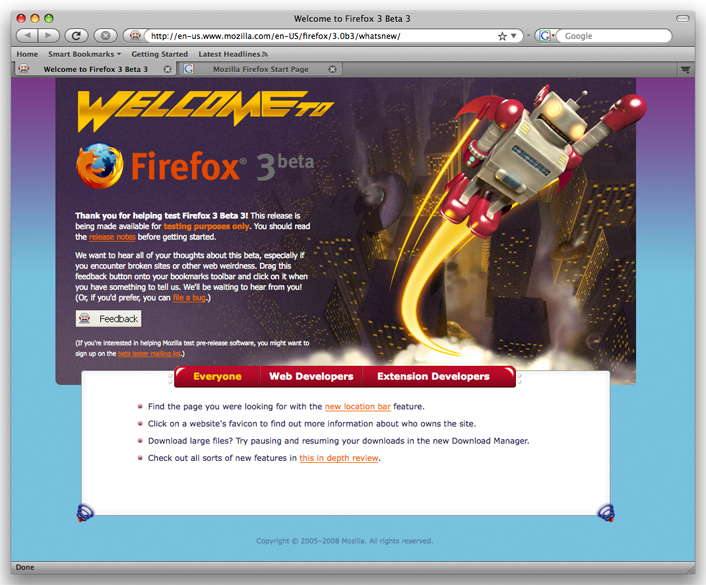
Remember, Firefox 3.0 beta 3 is beta software. If you use Firefox for work, you might want to stick with version 2. Users have reported problems with a few sites, including some of the major email providers like Yahoo, Windows Live Mail, and Gmail. But if you’re like me and have to be on the cutting edge, take a look at Firefox 3.0 beta 3 to see where browsers are headed.
Wherefor So Few Screencasts?
December 27, 2007After a little bit of a lull, I have been buying more software recently. The reasons why, I think, is that many of the websites have used screencasts to promote their software. Screencasts make for a much more compelling sales presentation. I probably would have looked right past OmniFocus if it hadn’t been for a very long screencast The Omni Group posted to their website. Screenshots and feature lists simply can’t capture the subtle interface details of many great programs.
Another such program, and the reason for this post, is 1Password. I took another look at it because of a post by Aaron Pelley over at his Criminal Defense Law with an Apple blog. I purchased a family license for 1Password today, and it was all thanks to the screencast on the 1Password website. I actually looked at 1Password a while ago when I was searching for an encrypted data manager. I wasn’t that interested in 1Password because it looked like a simple browser plugin that just upgraded the built-in auto-complete and password memory features. As the screencasts demonstrate quite well, 1Password is much more than that.
I ended up purchasing Data Guardian. I am quite happy with it, but it isn’t very well integrated with the browsers. As it happens, I am still glad I purchased Data Guardian because it is a great place to store credit card numbers, email passwords, and software license codes.
If my experience is representative, we will probably start seeing more and more screencasts as smart software publishers take advantage of a great way to market sophisticated software. I am a little surprised, though, that people aren’t picking up on this trend faster.
Macintosh Daily Rituals
December 23, 2007I spend a lot of time trying to stay abreast of all the latest developments in the Macintosh community. New software or hardware, reviews, apple rumors – I want to know it all. To accomplish that, I have a fairly long list of websites that I visit. Most of the sites I only visit occasionally – maybe two or three times a week. Others I visit like clockwork every single day (some even repeatedly throughout the day).
Without further ado, here’s my list:
MacInTouch: MacInTouch helps me keep my software up-to-date. Almost every day, MacInTouch posts links to new product announcements, new versions, and beta versions for Macintosh software.
MacNN: MacNN has news and reviews for Macintosh users. MacNN is listed second because Macintouch is often the first site that I visit in the morning. I visit MacNN several times a day, though – I like to stay on top of Macintosh news.
The Unofficial Apple Weblog (TUAW): TUAW is – as its name suggests – structured more like a blog. The articles tend to be a grab-bag of product announcements, new product versions, tips, reviews, and other news. TUAW doesn’t cover everything – that’s not the point. They cover things that are interesting – to them – and hopefully to you as well.
MacSurfer’s Headline News: MacSurfer’s has links to news articles on all the major mainstream media and tech news sites that involve either Apple (the company) or Apple products. It can get a bit repetitive at times because when something major happens every news site writes about it. It’s pretty comprehensive, though. So, if you don’t mind sifting through a long list of news items, MacSurfer’s can be a pretty good resource.
Rumor sites: MacRumors and AppleInsider. Until very recently, Thinksecret was on this list. But, now only two remain. There are many other Apple rumor sites, but I see MacRumors and Apple Insider as the most reliable. Usually, any reliable rumor that shows up on another site makes its way to one or both of these pretty quickly.
What Mac websites do you visit every day? Is there anything that should be on my list, but isn’t?
Mac Website Highlight: MacZot
November 30, 2007I thought I would wrap up the month by highlighting one of the few websites I visit every day: MacZot. I mentioned in my first post that I bought much more software for my Mac (actually Macs, plural) than I ever expected. One big factor leading to that result was MacZot.
MacZot is similar to woot!, except it lists Mac software. Almost every day, MacZot has a piece of Mac software on sale. On rare occasions, MacZot has a bundle of applications or application templates on sale. The MacZot sale price is usually very good. The catch is that the sale price is only available for that one day.
MacZot has served two useful purposes for me. First, it has allowed me to buy software that I wanted, but didn’t really need, by offering the software at a more affordable price. Second, it has introduced me to software that I didn’t know existed. I visit several Mac news websites regularly, but MacZot will still occasionally list software that I haven’t seen before.
To date, I have succumbed to temptation on MacZot 23 times in just over a year. The pace has slowed a little bit as my software stable has gotten larger. But still look forward every morning to finding out what that day’s special is on MacZot.